Talking the Talk: What Your Installer Actually Means by 'Scene,' 'Edge,' and 23 Other Terms

Photo: smart home installer technician tablet wiring modern house, via clarkelectricma.com
The first time a smart home installer walked through my cousin's house in suburban Denver, he said maybe forty sentences. At least fifteen of them contained words like "load," "scene," and "fallback." My cousin nodded along the entire time and understood roughly a third of it.
That's not unusual. The connected home industry loves its jargon, and newcomers get lost in it fast. So consider this your phrasebook — 25 terms, translated, with examples from actual American homes and a quick note on why each one matters.
The Core Vocabulary
1. Hub (or Bridge) — The central device that lets your gadgets talk to each other. Think of it as a translator sitting between your Wi-Fi router and your smart bulbs. Why it matters: If a product "requires a hub," that's an extra purchase and another plug in your outlet.
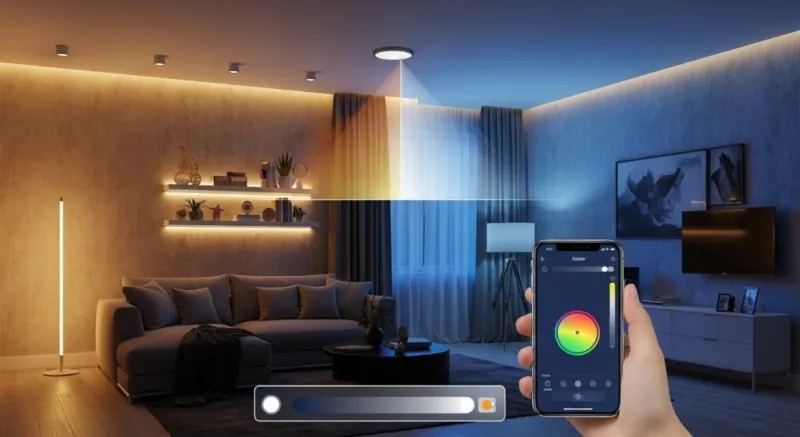
2. Scene — A saved group of settings triggered with one tap or voice command. "Movie Night" dims the living room to 20%, kills the lamps, and drops the thermostat two degrees. Why it matters: Scenes are the difference between a smart home and a remote-control collection.
3. Automation — A rule that runs on its own: "When the front door opens after sunset, turn on the hallway light." No tap required. Why it matters: Automations are where the magic (and the frustration) lives.
4. Trigger — The "when" part of an automation. Motion detected, door opened, 6:00 AM arrived. Why it matters: Bad triggers are why your lights randomly blink at 3 AM.
5. Routine — Marketing-speak for an automation, popularized by Amazon Alexa. Same idea, different branding. Why it matters: Same function; just don't pay more because the word is fancier.
Communication and Protocols
6. Protocol — The language devices use to communicate: Zigbee, Z-Wave, Thread, Wi-Fi. Why it matters: Devices speaking different protocols need a translator (see: hub).
7. Matter — A newer industry standard designed to make devices from different brands play nicely. Why it matters: A Matter-compatible gadget should work with Apple, Google, and Amazon ecosystems alike.
8. Thread — A low-power mesh network protocol. Every Thread device can pass messages along for its neighbors. Why it matters: More devices can actually strengthen the network instead of congesting it.
9. Mesh Network — Devices that relay signals for each other, forming a web rather than a single point of contact. Why it matters: Explains why smart plugs in the garage mysteriously help your hallway sensor stay connected.
10. Zigbee / Z-Wave — Two long-standing low-power mesh protocols. They compete, they coexist, and neither is going away. Why it matters: Check compatibility before buying; they don't cross-talk.
Control and Processing
11. Local Control — Your devices respond even when your internet is down, because commands are processed inside your house. Why it matters: Cloud-dependent gadgets turn into paperweights during an outage.
12. Cloud Dependency — The opposite of local control. The device phones home to a server before doing anything. Why it matters: If the manufacturer shuts down that server, your "smart" lock gets significantly less smart.
13. Edge Computing — Processing that happens on the device itself rather than in a distant data center. A camera that recognizes a package locally is doing edge computing. Why it matters: Faster responses, better privacy, less bandwidth.
14. Latency — The delay between command and action. Why it matters: Half a second is fine for a lightbulb; it's annoying for a door lock.
15. Firmware — The built-in software running on the device itself. Why it matters: Firmware updates fix bugs and security holes. Enable automatic updates.
16. OTA (Over-the-Air) — Updates delivered wirelessly. Why it matters: You shouldn't need to plug anything into a computer. Ever.
Devices and Sensors
17. Actuator — Anything that does something: a lock that bolts, a blind that lowers, a valve that shuts. Why it matters: The muscle of your setup, as opposed to...
18. Sensor — Anything that notices something: motion, temperature, open doors, water on the basement floor. Why it matters: Sensors are cheap and make automations genuinely useful.
19. Contact Sensor — A two-piece sensor that knows when a door or window opens. Why it matters: The workhorse of security and lighting automations.
20. Smart Plug — A socket that goes between the wall and anything you plug in, making that thing controllable. Why it matters: The cheapest, easiest on-ramp to home automation. Start here.
21. Load — Installer-speak for the thing being switched — the light fixture, the fan, the garbage disposal. Why it matters: "Neutral wire required" warnings on smart switches refer to your home's wiring, and older US homes often lack one in the switch box.
Security and Ecosystems
22. Two-Factor Authentication (2FA) — A second verification step beyond your password when logging into an app. Why it matters: Your front door lock deserves a password stronger than "password123," plus 2FA.
23. Geofencing — Automations based on your phone's location. "When I leave the neighborhood, lock everything and arm the alarm." Why it matters: Convenient, but it means your location data is part of the deal.
24. Integration — Making two different products or services work together, often through an app like Alexa, Google Home, or Apple Home. Why it matters: "Does it integrate with...?" should be question number one before any purchase.
25. Fallback — What a device does when its primary method fails. A smart lock with a physical key is a fallback. Why it matters: Always know the manual backup. Always.
Your Cheat Sheet Going Forward
You don't need to memorize all of this. Bookmark it, and the next time an installer mentions a "load" or a Reddit thread complains about "cloud dependency," you'll know exactly what's being discussed. Half of feeling confident in the connected home is just understanding the language — and now you do.